
Minor technical adjustments often yield the most significant performance shifts. Among these adjustments, the HTML title tag remains one of the most critical, yet frequently undervalued, on-page SEO elements.
A title tag is not merely a label for a webpage. It is the primary point of contact between a website and a search engine crawler, as well as the first interaction a potential visitor has with a brand on a search engine results page (SERP). Getting this single line of code wrong can result in suppressed organic rankings, low click-through rates, and wasted content production efforts.
This guide details the exact mechanics of title tag optimization, the structural formulas that drive search performance, and the strategic mistakes that must be avoided to protect search visibility.
What Is An HTML Title Tag?
To optimize a title tag, one must first understand its technical definition and infrastructure. An HTML title tag is an element specified in the header section of a webpage’s HTML document. It is designated by the <title> tag and is meant to provide a clear, concise declaration of the page’s core topic.
Where the Title Tag Appears
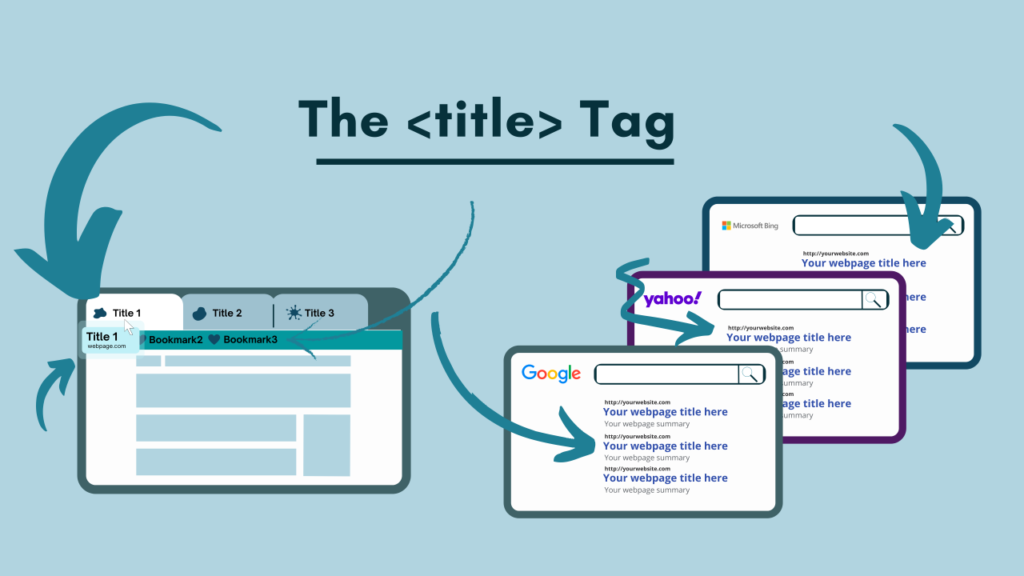
Unlike body content, the text within a title tag does not appear directly on the visible page area of a website. Instead, it is utilized in three highly visible external locations:
Search Engine Results Pages (SERPs): This is the large, clickable blue (or purple) link that search engines display for each organic result.
Web Browser Tabs: The text appears in the tab at the top of a web browser window. This helps users navigate between multiple open tabs.
Social Media Previews: When a webpage link is shared on platforms like LinkedIn, Facebook, or X (formerly Twitter), the title tag is automatically pulled to populate the preview card header.
The Critical Difference Between A Title Tag and An H1 Tag
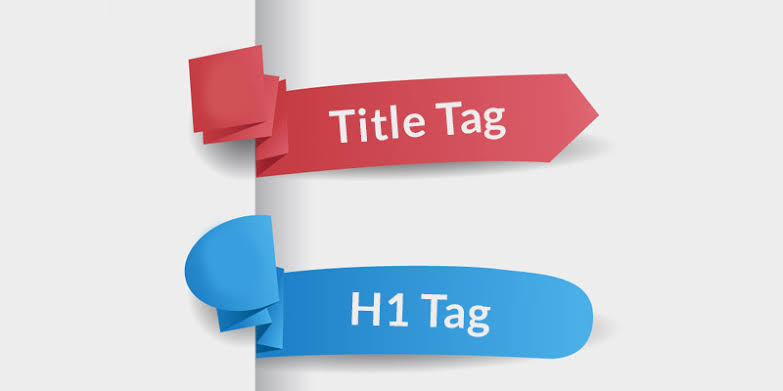
A common point of confusion is the distinction between the HTML title tag and the $H1$ header tag. While they sound similar, they serve entirely different purposes in the eyes of search engines and users.
       Title Tag (<title>)                          H1 Tag (<h1>)
┌───────────────────────────────┐           ┌───────────────────────────────┐
│ • Exists in the HTML <head>   │           │ • Exists in the HTML <body>   │
│ • Displays on search engine   │           │ • Displays on the actual page │
│   results pages (SERPs).      │    VS     │   for the reader to see.      │
│ • Targets search crawlers and │           │ • Confirms to the user that   │
│   external searchers.         │           │   they landed on the right page│
└───────────────────────────────┘           └───────────────────────────────┘
An optimized website keeps these two elements distinct yet complementary. The title tag acts as the external hook to bring visitors in, while the $H1$ tag serves as the internal headline that structures the page layout.
Why Title Tags Remain a Critical SEO Ranking Factor?
Search engines rely on a complex network of algorithms to index and rank webpages. While factors like backlinks, page speed, and content depth are vital, the title tag remains a primary relevance signal.
Search Engine Crawlers and Semantic Context
When a search engine bot crawls a page, it looks for semantic clues to determine what the page is about. The title tag is the very first place the bot looks to establish context. If the targeted primary keyword is missing from this tag, the search engine must work significantly harder to categorize the page. In competitive niches, this extra friction often results in lower baseline rankings.
The Direct Link to Click-Through Rate (CTR)
Organic ranking position is only half the battle. If a webpage ranks in the third position on Google but possesses a boring, uninspiring, or truncated title, searchers will bypass it in favor of lower-ranking results with better titles.
A high CTR indicates to search engine algorithms that a webpage is highly relevant to the searcher’s query. When a page consistently achieves a higher CTR than the positions around it, search engines often reward that page with a permanent ranking boost. Optimizing the title tag is the most direct way to manipulate this metric in a brand’s favor.
The Mathematics of Title Tag Length: Characters vs. Pixels
A common mistake is writing titles that are either too long or too short. If a title is too long, search engines will truncate it with an ellipsis (…), which ruins the readability of the link and hides crucial call-to-action phrases.
The 600-Pixel Rule
While many SEO guides state that title tags should be kept under 60 characters, search engines do not actually measure title length by character count. Instead, they measure by pixel width.
Google’s desktop search results display title tags up to a maximum width of 600 pixels. Because different characters occupy different pixel widths (for example, a capital “W” takes up significantly more horizontal space than a lowercase “i”), a hard character limit is not always accurate.
To ensure a title tag displays perfectly across both desktop and mobile layouts without truncation, adhere to these guidelines:
Optimal Character Range: Keep titles between 50 and 60 characters.
Optimal Pixel Range: Aim for a total width under 575 to 600 pixels.
The Mobile Factor: Mobile screens have a slightly different display area, often allowing two lines for title tags, but keeping titles within the 60-character limit ensures clean presentation across all devices.
The Danger of Short Titles
Conversely, titles that are too short (under 30 characters) are a wasted opportunity. A title that simply says “Services” or “Contact” fails to provide context to search crawlers and fails to entice users. Every title tag must utilize the available space strategically to maximize keyword relevance and user context.
Strategic Keyword Placement Formulas
Writing a high-performing title tag is a science. It requires balancing technical optimization (for search crawlers) with psychological appeal (for human searchers). Below are the proven structural formulas used to draft high-ranking title tags.
Formula 1: The Standard On-Page Optimizer
This is the most reliable structure for standard service pages, category pages, and local landing pages.
Example:
SEO Services - Custom Marketing Audits | Tech Charger
Why it works: The primary keyword is placed at the absolute front of the title. Search engine algorithms assign more weight to keywords that appear in the first few words of a title tag.
Formula 2: The Action-Oriented Guide
This structure is ideal for blog posts, educational resources, and guides designed to solve a specific user problem.
Example:
How to Write Title Tags for SEO (Step-by-Step Guide) | WritingTech
Why it works: It clearly defines the format of the content (a guide) and uses parenthetical elements, which have been shown to increase user CTR by providing visual separation.
Formula 3: The Local Business Framework
For businesses operating in specific geographic locations, including the location within the title is non-negotiable for local search visibility.
Example:
Digital Marketing Agency London | Tech Charger
Why it works: It instantly matches the search intent of users looking for proximity-based services and tells Google’s localized algorithm exactly where to display the business.
Aligning Title Tags with User Search Intent
Keywords alone will not drive conversions. A title tag must align perfectly with the specific type of search intent behind the user’s query. Search intent generally falls into three main categories: informational, transactional, and navigational.
Informational Intent
The user is looking to learn something, solve a problem, or gather data.
Keyword Clues: How to, guide, what is, tips, steps, tutorial.
Title Tag Strategy: Focus on clarity, ease of use, and the promise of a complete solution.
Example:
How to Fix Title Tag Truncation in 5 Minutes
Transactional Intent
The user is ready to buy a product, hire a service, or download a resource.
Keyword Clues: Buy, hire, service, pricing, best, cheap.
Title Tag Strategy: Use action verbs, feature pricing elements, or mention specific trust factors.
Example:
Hire Professional Academic Writers (24/7 Support)
Navigational Intent
The user is looking for a specific brand, portal, or login page.
Keyword Clues: Brand name, login, portal, contact.
Title Tag Strategy: Ensure the brand name is prominent and the destination is unmistakable.
Example:
Client Portal Login | WritingTech
Why Google Rewrites Title Tags (And How to Prevent It)
A frustrating reality for many digital marketers is that Google does not always display the drafted title tag. In August 2021, Google rolled out an update to its title generation system, allowing the algorithm to dynamically rewrite titles in search results if it deems the original tag insufficient.
The Main Triggers For Google Title Overwrites
Understanding why Google alters titles is the first step to ensuring your drafted titles remain intact. The primary triggers include:
Keyword Stuffing: Cramming multiple variations of the same keyword into a single title (e.g.,
SEO Agency, Best SEO Agency, Local SEO Agency, Top SEO Agency). This violates Google’s quality guidelines, and the algorithm will replace it with a simplified version or the page’s $H1$.Boilerplate Text: Using the exact same title structure across hundreds of pages with only minor changes (e.g., changing only the product name on identical layouts).
Inaccurate or Outdated Titles: Keeping a year in the title that does not match the content (e.g., having “2025 Guide” in the title but the content has not been updated since 2024).
Discrepancy with the H1: If the title tag says something completely different from the main $H1$ tag on the page, Google’s system may choose the $H1$ as the SERP title to prevent user confusion.
How To Keep Control of Your Titles?
To minimize the chances of a search engine rewriting your title tags, follow these quality assurance steps:
- Keep the H1 and Title Tag Aligned: Ensure both tags feature the same primary target keyword and convey the exact same message, even if the formatting is slightly different.
- Avoid Duplicate Titles: Every single page indexed on a website must possess a completely unique title tag.
- Write for Humans First: Do not write titles solely for search engines. If a title sounds robotic, forced, or overly optimized, search engines will likely rewrite it to sound more natural to the end user.
Common Title Tag Mistakes To Avoid
To protect search rankings from sudden drops, avoid these common optimization mistakes:
Ignoring the Brand Name: Failing to include the brand name at the end of the title misses an opportunity to build long-term brand authority and search trust.
Using Default CMS Settings: Allowing platforms to automatically generate titles based on page file names often leads to messy tags like
home-page-v2-final | Brand.Forgetting to Update Year-Specific Content: Leaving outdated years in a title tag signals to users that the information is obsolete, which instantly tanks the CTR.
Failing to Track Performance: Once a title tag is updated, it must be monitored. Use Google Search Console to track whether the new title increases or decreases the page’s average CTR over a 30-day period.
Checklist For Perfect Title Tags
Use this quick checklist before publishing any new page online:
| Checkpoint | Requirement | Verified |
| Length | Between 50 and 60 characters (Under 600 pixels) | [ ] |
| Keyword Placement | Primary keyword placed near the front of the title | [ ] |
| Brand Inclusion | Brand name included at the end with a separator (` | or-`) |
| Uniqueness | The title is completely unique from all other pages on the site | [ ] |
| Readability | Grammatically correct, natural-sounding, and avoids keyword stuffing | [ ] |
| Intent Alignment | The hook matches the specific informational or transactional intent of the searcher | [ ] |
Bottom Line
A title tag is your website’s digital handshake. If it is too long, Google cuts it off; if it is stuffed with keywords, Google rewrites it. Keep your titles under 60 characters, put your most important keyword first, and write for real human beings who are deciding whether to click on your link.
FAQs
What Is An HTML Title Tag?
It is a line of HTML code defining a webpage’s title, visible on search engine results and browser tabs.
Why Do Title Tags Matter For SEO?
They tell search engine crawlers exactly what your page is about and directly influence whether searchers click your link.
How Long Should A Title Tag Be?
Keep your titles between 50 and 60 characters to prevent them from being cut off in search results.
What Is The 600-pixel Rule?
Google measures title space by pixels, not letters. Keep titles under 600 pixels to ensure they display fully.
Where Should I Put My Main Keyword?
Place your primary keyword at the very beginning of the title tag so search engines prioritize its ranking relevance.